VECM (Vector Error Correction Model) Builder
While the Engle-Granger model shows where the equilibrium is and how far the spread has stretched, the Vector Error Correction Model (VECM) tells you how and when it will snap back: which of the two assets is doing the heavy lifting to close the spread, its speed of adjustment ($\alpha$), and the exact Half-Life in days.
Vector Error Correction Model (Formula on Formula)
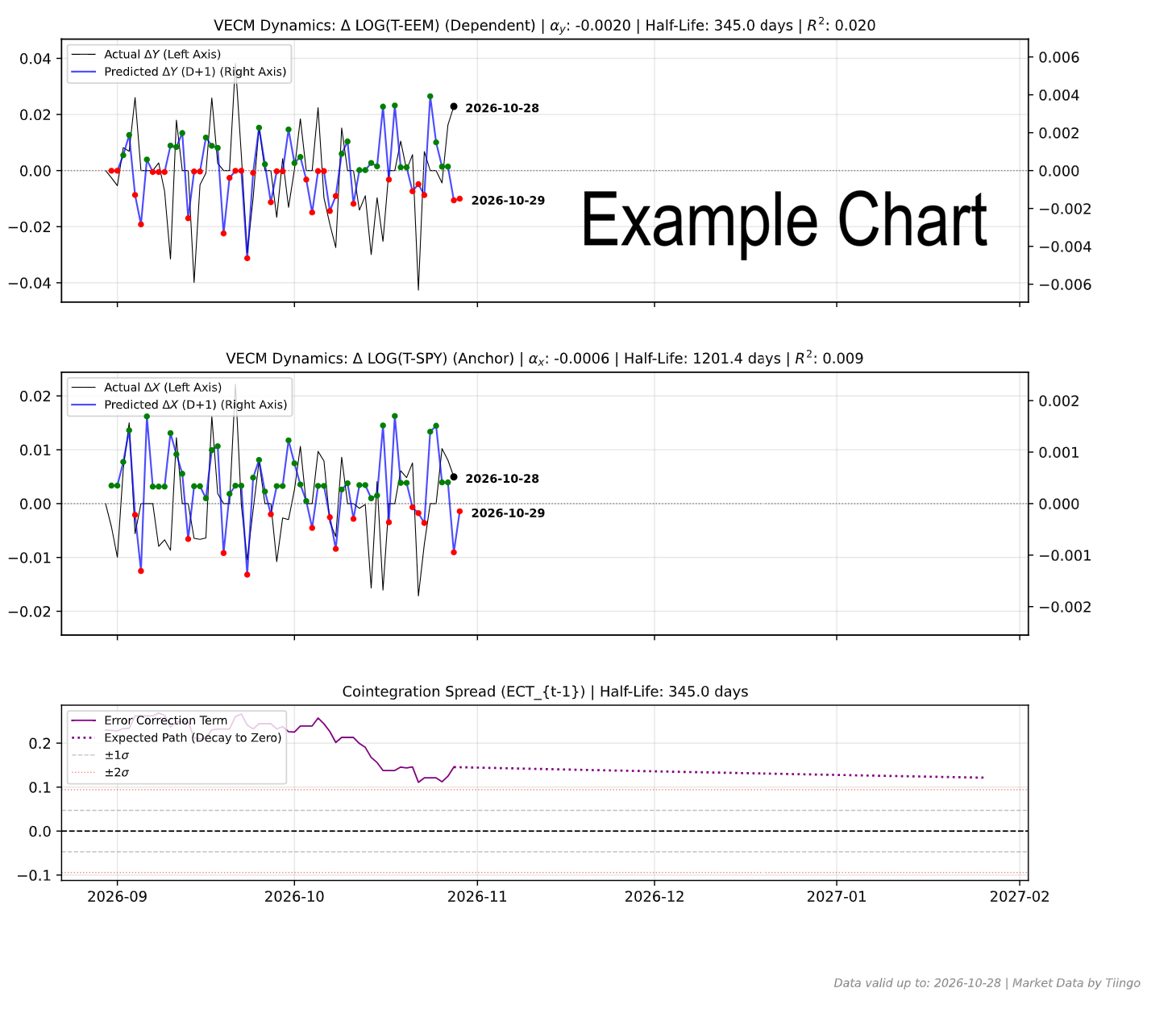
VECM Plots (Free Demos and Paid)
Below we have some plot suggestions of ticker pairs for VECM cointegration dynamics. For the rank of best Engle-Granger regressions see: Insights on the Best Engle Granger Regressions. The ADF and ADF p noted on the suggestions are from 2026-09-10, click on the plot for a fresh VECM dashboard and half-life estimate.
The Quantitative Trader’s Guide: Mastering the VECM Dashboard
1. The Core Philosophy: Why VECM?
When you use a standard Engle-Granger (EG) regression, you are looking at the where — "Where is the equilibrium, and how far has the spread stretched?"
The Vector Error Correction Model (VECM) tells you the how and the when. It takes that stretched rubber band (the spread) and mathematically answers two critical questions:
- Which of the two assets is going to move to fix this spread?
- Exactly how fast is it going to snap back?
Because a spread can be closed by Asset Y dropping, Asset X rising, or both moving toward each other, looking at just the EG spread leaves you blind. The VECM system splits the physics into two panes: the momentum of Asset Y (the Dependent) and the momentum of Asset X (the Anchor).
2. Decoding the Math: Alphas and Half-Lives
At the top of your panes, you will see $\alpha$ (Speed of Adjustment). The VECM predicts today's price change by looking at yesterday's spread size. The math is essentially: Expected Daily Change = Alpha × Yesterday's Spread.
- Why is $0$ stubborn? If $\alpha = 0$, the asset completely ignores the dislocation. It refuses to mean-revert.
- Why is $-1$ instant? If $\alpha = -1$, the asset will move the exact opposite amount of the error, wiping out 100% of the dislocation in a single day (teleporting to equilibrium).
- Why must it be negative? If an asset is priced too high relative to equilibrium, it must have a negative price change to fix it. If $\alpha$ were positive, the asset would explosively trend away from equilibrium (this means it is driven by momentum, not mean-reversion).
The Half-Life: Because human brains are bad at grasping daily fractional velocities like $\alpha = -0.04$, the dashboard provides the Half-Life. This translates the speed into human days: it tells you exactly how many days it will take to close 50% of the gap.
Note on "Full-Life": In quantitative finance, we never use "Full-Life". Because mean-reverting processes are modeled using exponential decay, the curve approaches the zero line asymptotically. Mathematically, it never reaches exactly zero, meaning the "Full-life" is technically infinite. Half-life is the standard, statistically sound metric to gauge capital lock-up time.
3. Interpreting the 3-Pane Dashboard
Pane 3: The Bottom Pane (The Spring)
This is your Error Correction Term (ECT). It represents the raw dislocation or "tension".
- The Zero Line: Represents the historical average equilibrium.
- You are waiting for this purple line to stretch past the $\pm 1\sigma$ or $\pm 2\sigma$ standard deviation bands. When it breaches these lines, the rubber band is under extreme tension.
Panes 1 & 2: The Top & Middle Panes (Prediction vs. Reality)
These panes plot Daily Changes ($\Delta Y$ and $\Delta X$), not absolute prices.
- The Zero Line: Represents exactly 0% growth (the price didn't change from yesterday).
- The Thin Black Line (Left Axis): The actual historical daily price change of the asset. If it's above the zero line, the asset went up that day.
- The Solid Blue Line (Right Axis): The VECM's prediction for the daily price change. We use a "Zero-Aligned Twin-X Axis" here because actual daily volatility (black line) is massive, while macro-driven predictions (blue line) are tiny. The dual-axis magnifies the blue line so you can clearly see the model's structural bias without it looking flat.
- The Red and Green Dots: These overlay the blue line to highlight the model's directional bias for tomorrow:
- Green Dot: The model expects the asset's price to go UP tomorrow ($>0$).
- Red Dot: The model expects the asset's price to go DOWN tomorrow ($<0$).
- Example: If the black line is above zero today, and tomorrow prints a green dot, the model is predicting two consecutive up-days.
4. The Two R2 Paradox (Levels vs. Returns)
You may notice an EG plot has a great R2 (e.g., 0.24), while the VECM R2 is incredibly tiny (e.g., 0.001). This is completely normal and not a bug.
- The Engle-Granger R2 predicts absolute Price Levels. Because both assets generally drift upward over a decade, the model easily finds a strong correlation.
- The VECM R2 predicts Daily Percentage Returns. Daily returns are notoriously dominated by random walk noise. Predicting even 0.1% of a daily return using a macro spread is considered a structural edge in quant finance.
5. Blue-Sky vs. Slow-Grind Scenarios
Both the EG model and VECM align perfectly. The ADF p-value is excellent, and the VECM Half-Life is short (e.g., 14 to 22 days). The $\alpha$ values are cleanly negative. This means the rubber band is tight, and when it stretches, it snaps back within a trading month. This is highly actionable for medium-term options or swing trades.
You might find a pair with an excellent EG ADF p-value (proving they will mean-regress eventually), but the VECM shows a tiny $\alpha$ (e.g., -0.0009) and a massive Half-Life (e.g., 771 days). Furthermore, Asset X might even have a positive $\alpha$ (meaning its Half-Life is NaN), indicating Asset X refuses to close the gap and Asset Y is doing 100% of the heavy lifting.
The Takeaway: The VECM just saved you from a bad trade. The EG model proved the equilibrium exists, but the VECM warned you that the return to the average spread will be an agonizingly slow, multi-year grind. Do not trade this with short-dated instruments.
6. Tracking Divergence: How to Act
The true edge in this chart comes from the visual gap between the Black Line (reality) and the Blue Line (the model).
When the black line tightly tracks the blue line and the green/red dots, the mean-reverting gravity of the cointegration is overpowering market noise. The model is in total control. It is safe to put on size.
If the model prints a steep red dot (predicting a sharp drop), but the black line spikes violently upward, momentum is fighting the rubber band. Fundamental news or aggressive flow is temporarily hijacking the asset, ignoring the macro equilibrium. Do not blindly average up on a losing position. Wait for the momentum to break and the black line to "crack" back toward the blue prediction before adding size.
7. The T-1 Reality Check & The LOG Warning (Crucial)
Look at the bottom right of your Engle-Granger chart or the date labels on the dots on our VECM chart panes: "Data valid up to: [Date]". This framework operates on daily close prices. Often the last available price is for yesterday’s market close, sometimes there is a delay and we have the last price before yesterday. The green or red dot on the extreme right edge of the blue line is the model telling you exactly what it expects the asset to do on (last available price day + 1), based on where the tension was on the last available price.
In any case this day-by-day prediction is probably just useful for deciding on a good day to start a position. Most people using our tools start it small and build it larger if needed expecting a return to the Engle-Granger predicted spread. The VECM chart for them is mostly for knowing the half-life and seeing the prediction on how it will exponentially decay towards this half-life (presented on the bottom pane in dotted line).
The day-to-day predictions can be helpful even for investors to know whether they can trim their positions or wait or add to their positions or wait. Before selling or buying today in your brokerage, you must check live intraday prices to ensure the mean-reversion move hasn't already happened. However, you must first check the chart title to see if a LOG transformation is being used (e.g., VECM Dynamics: Δ LOG(T-URA)):
- If LOG is NOT used: The Y-axis represents actual prices or standard percentages. A predicted drop can be directly compared to live market action.
- If LOG IS used: Unless stated otherwise, all our logs are calculated in base 2. This means the Y-axis represents the change in the base-2 logarithm, not a simple percentage. A prediction of
-0.05on a base-2 log scale does not equal a-5%drop. You cannot directly compare a $\Delta \text{LOG}$ red dot to a standard percentage drop on your brokerage screen without converting it first (e.g., calculating $2^{\text{prediction}} - 1$).
If the live market has already moved heavily in the correctly scaled predicted direction, the alpha has executed. Do not chase a spread that the market has already closed intraday.
Ticker Data Usage, Data Sourcing and Ticker Functions
Ticker Data Sources
Default Ticker Column Projections & Adjustments
ADD() Element-wise adding
ADD(T-AAPL, T-MSFT) or ADD(T-GLD, 10.5).
CLOSE_GAPS() Interpolating and extrapolating sparse data
CLOSE_GAPS(ES-teicp000-coicop18, 'LINEAR', 'FORWARD_FILL', 60).
CURVE_FROM_VECTOR() Custom data vectors
CURVE_FROM_VECTOR([198.27, 211.92, 245.12, 281.72, 318.27], '2026-06-30', 'last', '1y', 'linear', 'forward_fill').
Arguments represent the array of values, anchor date, anchor position ('first' or 'last'), frequency ('1y', '1q', '1m'), interpolation ('linear', 'forward_fill'), and extrapolation ('none', 'forward_fill', 'linear').
LAG() Time-shifted underlying vector
LAG(T-AAPL, 10). It is highly useful for autocorrelation studies.
LINEAR_COMBINATION() Weighted sum of multiple vectors
LINEAR_COMBINATION([1.5, -0.5], [T-AAPL, T-MSFT]).
LOG() Logarithmic transformation
LOG(T-GOOGL, 2) or LOG(T-MSFT, 10). If you want you can use EPSILON constant which is not a natural logarithm constant, but just a logarithm on a tiny base: LOG(T-SPY, EPSILON). We encourage using LOG on the base two as it is the fastest to compute for you and will allow caching of the computation for others to benefit.
The LOG on base 2 will also mean you are measuring how long it takes for the time series to double, a difference in 1 point is a doubling.
LOOK_FORWARD() Shifting data forward in time
LOOK_FORWARD(T-AAPL, 30).
The second argument 30 is the number of days to look forward. All our data for time series is measured in days.
MATH- Custom Mathematical Tickers
MINUS() Element-wise subtraction
MINUS(T-AAPL, T-MSFT).
MOVING_AVERAGE() Trailing Simple Moving Average
MOVING_AVERAGE(T-SPY, 200) calculates the 200-day trailing moving average.
MULT() Element-wise multiplication
MULT(T-COM, T-USDCHF)
performs a currency conversion of the T-COM broad commodity investment basket to Swiss Francs (most of our tickers are in USD and that
ticker price currency can be seen on the ticker selector page). T-COM is the: DIREXION AUSPICE BROAD COMMODITY STRATEGY ETF.
RAT() Calculating Ratio Between Two Tickers
RAT(T-AAPL, T-MSFT). Example of comparing Google's outperformance to an idealized
CAGR curve: RAT(T-GOOGL,T-MSFT)/MATH-CAGR_PCT-2 (requires login with Google).
REGRESSION() and RESIDUALS() Functions
(1) The REGRESSION or RESIDUAL functions are reserved for paying users, apart from the free tier REGRESSION examples present on the log plot page.
(2) When the REGRESSION() function is the outermost function of the expression and is used on the log plotter, it will cause a nice regression plot canvas to display the fitting line and useful regression statistics such as ADF probability and R².
If used on the regular ratio plotter page, it will plot the residuals vector. Example: REGRESSION(LOG(T-URTH,2)) (this example requires subscription as it uses the LOG function).
The REGRESSION function is very good at modelling time series that grow following a linear trend. Most financial assets grow following an exponential trend, which means that if we apply the LOG function to this asset ticker we obtain a linear trend which can be modelled by the REGRESSION function. Try it, try plotting just LOG(T-GOOGL) to see this straight line tendency.
RET() Rolling Percentage Return
RET(T-SPY, 30)
measures the rolling 30-day percentage performance. The return for a day is always measured looking back
at the last x days (30 in the example), otherwise we would introduce look-ahead bias into our models of returns.
To calculate forward returns you can combine the two functions RET(LOOK_FORWARD(T-GOOGL,30),30). Easy right?
ROLLING_SLOPE() Calculating slope, velocity, or derivating
ROLLING_SLOPE(IMF-NGDPD-CHN, 400, 1). The second argument (400) is the lookback
window in days to calculate the smoothed slope. The third argument (1) determines the scalar output
granularity (e.g., 1 for daily velocity, 365 to annualize the velocity).
Example: China GDP Velocity.
SIMUL_TICKER_DIV_REINVEST() Plotting Dividends Reinvested at Your Portfolio Return Rate
SIMUL_TICKER_DIV_REINVEST(T-MSFT,0.25,1,'2022-08-01').
This is a function available only for users with the advanced subscription. The first argument is the
Ticker simulated, the second is your portfolio CAGR rate (in this case 0.25 = 25% yoy, applied dynamically daily).
The third argument is the initial investment in the currency of the stock ticker. The last argument is the
start date. See our article on dividend reinvestment simulation.
VOLATILITY() Annualized Rolling Volatility
VOLATILITY(T-SPY, 50) measures the annualized volatility of
the S&P 500 utilizing a 50-day rolling lookback window. The Scatter plot tool
has some examples of the VOLATILITY function.
Z_SCALE() Z scaling, bringing data to the normal curve Z score scale, normalizing
Z_SCALE(T-MSFT),
Z_SCALE(RAT(T-GLD,T-SLV)), Z_SCALE(ROLLING_SLOPE(T-COM,90,1)). This brings
absolute price vectors or ratios to a standardized Normal Curve (Mean 0, StdDev 1) for macro-economic
cycle alignment. This function is available only for users with the advanced subscription.
The Buffett Indicators Tool allows plotting the Z-Scale spread
of the country ETF price to its GDP figures.