Plot Seasonality for Ticker
Enter one financial asset ticker (e.g. T-USO-SplitAdjClose). You can copy tickers into a basket using the ticker selector.
Suggested Seasonality Plots (All allowed for non-subscribers)
Understanding Seasonality Models:
Find the best seasonality models ranked in: Seasonality insights page.
Read an article explaning how to interpret a seasonality model using the legend below: MSCI World Seasonality, Sep 2026.
Seasonality Chart Legend:
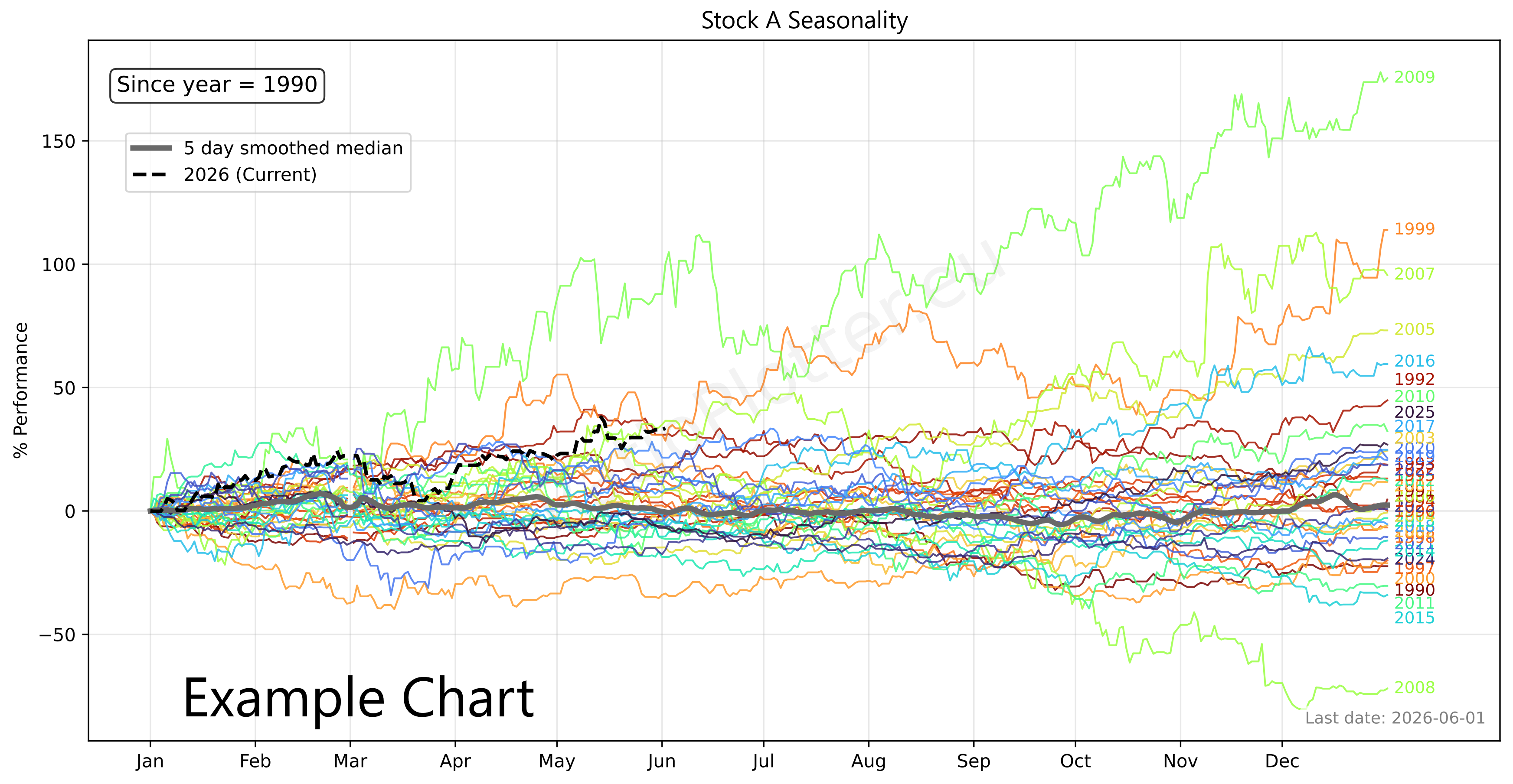
Colored lines (Normalized YTD for various years):
Thick gray line (Composite, the seasonality curve = median of colored lines):
Black dotted line: the current year to date
The Bottom Panel: flattened grey and black dotted lines.
We suggest using the seasonality as a complement to another model such as Engle-Granger. When the two models point in the same direction we typically have a better opportunity for an entry.
This seasonality chart doesn't just show historical averages; it rigorously backtests the calendar shape to prove whether the seasonal signal actually possesses predictive edge for deploying capital.
The layout is broken down into interconnected layers:
(A) The master smoothed median, utilizing all available historical data to give you as much forward predicting power as possible.
(B) A strictly isolated prediction curve based on the training data (i.e. all data minus the last 380 days).
(C) The actual market reality over a hidden holdout window (the last 380 days).
The Out-of-Sample Holdout Engine:
To prevent "look-ahead bias" (the illusion of predictability caused by testing a model on the same data used to build it), the engine physically clamps the timeline. It hides the last 380 days (Curve C) from the math engine entirely, forcing the system to predict the future using only older data (Curve B). It runs this holdout test 3 consecutive times to ensure a single lucky year doesn't inflate the asset's predictive score.
The 3 "Hit Rate" Metrics (R-Squared):
1. Standard R² of B vs C: Measures raw directional accuracy. While useful, this can be a trap. If an asset is in a massive multi-year secular bull market, it goes up regardless of the calendar month or year, creating a falsely high Standard R². This is not the pure yearly seasonality, it contains the secular growth or decay.
2. Detrended R² (curves not shown): To defeat the secular growth trap, this metric mathematically strips out the historical compound growth rate found in the seasonal trend from both the prediction and the reality before scoring them for correlation. But what if the historical compound growth is reflecting a bull market positive growth rate, but the reality of the hold out data is that we entered a bear market? The thir R² measurement below address this case. You should know when the last 380 days changed secular trend and use the third R² and not the second.
3. Pure Seasonal R² of B' vs C': The ultimate shape-correlation test. It completely neutralizes macroeconomic noise by using Ordinary Least Squares (OLS) regression to flatten both the prediction (B') and the actual holdout (C') to a zero-slope horizontal axis. To avoid the "U-shaped residual" loophole common in exponentially compounding assets, the engine applies log-linear regression to properly extract the pure seasonal shape (what we call flattened).
Trading Notes & Guide
Ticker Data Usage, Data Sourcing and Ticker Functions
Ticker Data Sources
Default Ticker Column Projections & Adjustments
ADD() Element-wise adding
ADD(T-AAPL, T-MSFT) or ADD(T-GLD, 10.5).
CLOSE_GAPS() Interpolating and extrapolating sparse data
CLOSE_GAPS(ES-teicp000-coicop18, 'LINEAR', 'FORWARD_FILL', 60).
CURVE_FROM_VECTOR() Custom data vectors
CURVE_FROM_VECTOR([198.27, 211.92, 245.12, 281.72, 318.27], '2026-06-30', 'last', '1y', 'linear', 'forward_fill').
Arguments represent the array of values, anchor date, anchor position ('first' or 'last'), frequency ('1y', '1q', '1m'), interpolation ('linear', 'forward_fill'), and extrapolation ('none', 'forward_fill', 'linear').
LAG() Time-shifted underlying vector
LAG(T-AAPL, 10). It is highly useful for autocorrelation studies.
LINEAR_COMBINATION() Weighted sum of multiple vectors
LINEAR_COMBINATION([1.5, -0.5], [T-AAPL, T-MSFT]).
LOG() Logarithmic transformation
LOG(T-GOOGL, 2) or LOG(T-MSFT, 10). If you want you can use EPSILON constant which is not a natural logarithm constant, but just a logarithm on a tiny base: LOG(T-SPY, EPSILON). We encourage using LOG on the base two as it is the fastest to compute for you and will allow caching of the computation for others to benefit.
The LOG on base 2 will also mean you are measuring how long it takes for the time series to double, a difference in 1 point is a doubling.
LOOK_FORWARD() Shifting data forward in time
LOOK_FORWARD(T-AAPL, 30).
The second argument 30 is the number of days to look forward. All our data for time series is measured in days.
MATH- Custom Mathematical Tickers
MINUS() Element-wise subtraction
MINUS(T-AAPL, T-MSFT).
MOVING_AVERAGE() Trailing Simple Moving Average
MOVING_AVERAGE(T-SPY, 200) calculates the 200-day trailing moving average.
MULT() Element-wise multiplication
MULT(T-COM, T-USDCHF)
performs a currency conversion of the T-COM broad commodity investment basket to Swiss Francs (most of our tickers are in USD and that
ticker price currency can be seen on the ticker selector page). T-COM is the: DIREXION AUSPICE BROAD COMMODITY STRATEGY ETF.
RAT() Calculating Ratio Between Two Tickers
RAT(T-AAPL, T-MSFT). Example of comparing Google's outperformance to an idealized
CAGR curve: RAT(T-GOOGL,T-MSFT)/MATH-CAGR_PCT-2 (requires login with Google).
REGRESSION() and RESIDUALS() Functions
(1) The REGRESSION or RESIDUAL functions are reserved for paying users, apart from the free tier REGRESSION examples present on the log plot page.
(2) When the REGRESSION() function is the outermost function of the expression and is used on the log plotter, it will cause a nice regression plot canvas to display the fitting line and useful regression statistics such as ADF probability and R².
If used on the regular ratio plotter page, it will plot the residuals vector. Example: REGRESSION(LOG(T-URTH,2)) (this example requires subscription as it uses the LOG function).
The REGRESSION function is very good at modelling time series that grow following a linear trend. Most financial assets grow following an exponential trend, which means that if we apply the LOG function to this asset ticker we obtain a linear trend which can be modelled by the REGRESSION function. Try it, try plotting just LOG(T-GOOGL) to see this straight line tendency.
RET() Rolling Percentage Return
RET(T-SPY, 30)
measures the rolling 30-day percentage performance. The return for a day is always measured looking back
at the last x days (30 in the example), otherwise we would introduce look-ahead bias into our models of returns.
To calculate forward returns you can combine the two functions RET(LOOK_FORWARD(T-GOOGL,30),30). Easy right?
ROLLING_SLOPE() Calculating slope, velocity, or derivating
ROLLING_SLOPE(IMF-NGDPD-CHN, 400, 1). The second argument (400) is the lookback
window in days to calculate the smoothed slope. The third argument (1) determines the scalar output
granularity (e.g., 1 for daily velocity, 365 to annualize the velocity).
Example: China GDP Velocity.
SIMUL_TICKER_DIV_REINVEST() Plotting Dividends Reinvested at Your Portfolio Return Rate
SIMUL_TICKER_DIV_REINVEST(T-MSFT,0.25,1,'2022-08-01').
This is a function available only for users with the advanced subscription. The first argument is the
Ticker simulated, the second is your portfolio CAGR rate (in this case 0.25 = 25% yoy, applied dynamically daily).
The third argument is the initial investment in the currency of the stock ticker. The last argument is the
start date. See our article on dividend reinvestment simulation.
VOLATILITY() Annualized Rolling Volatility
VOLATILITY(T-SPY, 50) measures the annualized volatility of
the S&P 500 utilizing a 50-day rolling lookback window. The Scatter plot tool
has some examples of the VOLATILITY function.
Z_SCALE() Z scaling, bringing data to the normal curve Z score scale, normalizing
Z_SCALE(T-MSFT),
Z_SCALE(RAT(T-GLD,T-SLV)), Z_SCALE(ROLLING_SLOPE(T-COM,90,1)). This brings
absolute price vectors or ratios to a standardized Normal Curve (Mean 0, StdDev 1) for macro-economic
cycle alignment. This function is available only for users with the advanced subscription.
The Buffett Indicators Tool allows plotting the Z-Scale spread
of the country ETF price to its GDP figures.