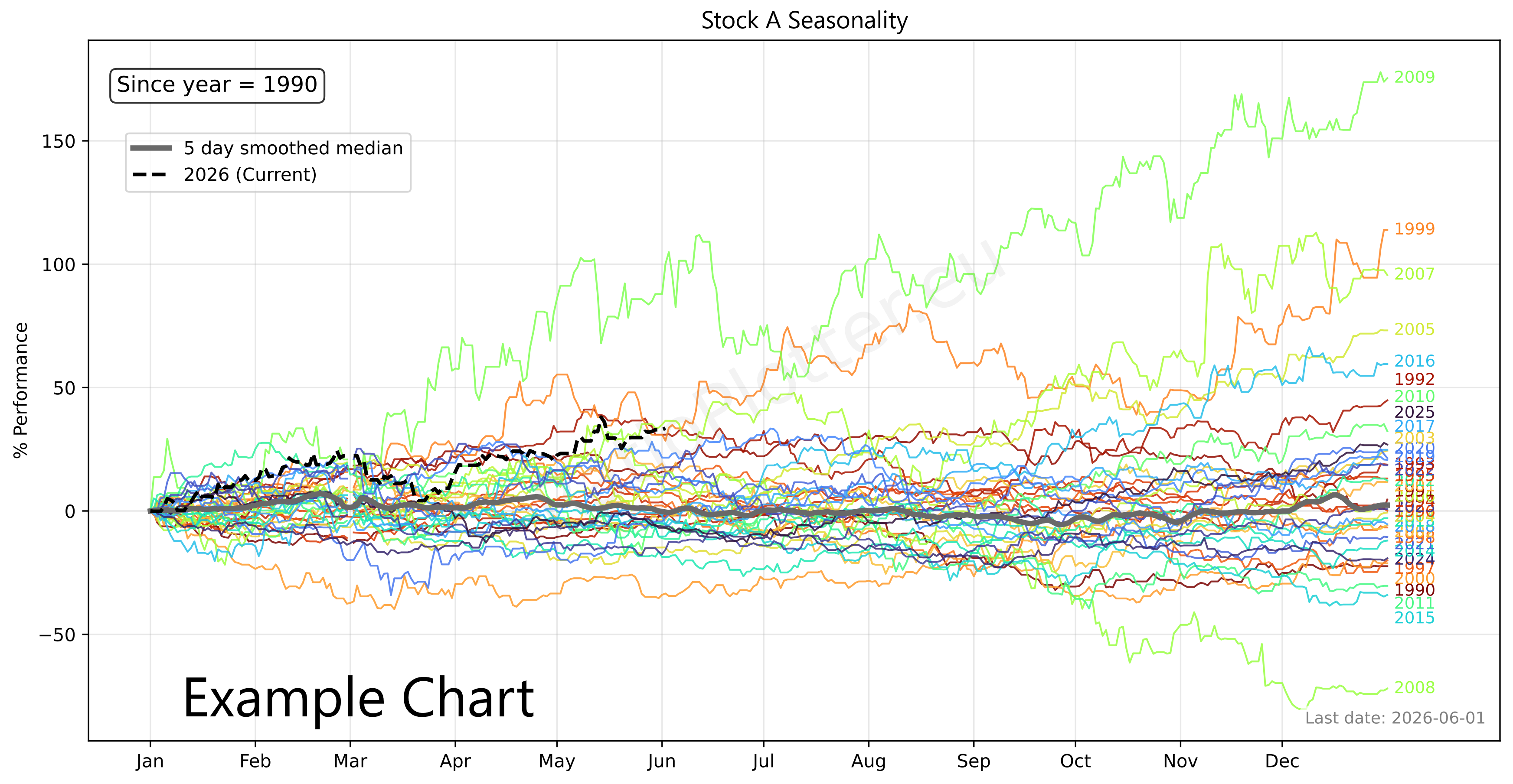
Plot Seasonality for Ticker
Enter one financial asset ticker (e.g. T-USO-SplitAdjClose). You can copy tickers into a basket using the ticker selector.
Understanding Seasonality Models:
Find the best seasonality models ranked in: Seasonality insights page.
Read an article explaning how to interpret a seasonality model using the legend below: MSCI World Seasonality, Sep 2026.
Seasonality Chart Legend:
Colored lines (Normalized YTD for various years):
Thick gray line (Composite, the seasonality curve = median of colored lines):
Black dotted line: the current year to date
The Bottom Panel: flattened grey and black dotted lines.
We suggest using the seasonality as a complement to another model such as Engle-Granger. When the two models point in the same direction we typically have a better opportunity for an entry.
This seasonality chart doesn't just show historical averages; it rigorously backtests the calendar shape to prove whether the seasonal signal actually possesses predictive edge for deploying capital.
The layout is broken down into interconnected layers:
(A) The master smoothed median, utilizing all available historical data to give you as much forward predicting power as possible.
(B) A strictly isolated prediction curve based on the training data (i.e. all data minus the last 380 days).
(C) The actual market reality over a hidden holdout window (the last 380 days).
The Out-of-Sample Holdout Engine:
To prevent "look-ahead bias" (the illusion of predictability caused by testing a model on the same data used to build it), the engine physically clamps the timeline. It hides the last 380 days (Curve C) from the math engine entirely, forcing the system to predict the future using only older data (Curve B). It runs this holdout test 3 consecutive times to ensure a single lucky year doesn't inflate the asset's predictive score.
The 3 "Hit Rate" Metrics (R-Squared):
1. Standard R² of B vs C: Measures raw directional accuracy. While useful, this can be a trap. If an asset is in a massive multi-year secular bull market, it goes up regardless of the calendar month or year, creating a falsely high Standard R². This is not the pure yearly seasonality, it contains the secular growth or decay.
2. Detrended R² (curves not shown): To defeat the secular growth trap, this metric mathematically strips out the historical compound growth rate found in the seasonal trend from both the prediction and the reality before scoring them for correlation. But what if the historical compound growth is reflecting a bull market positive growth rate, but the reality of the hold out data is that we entered a bear market? The thir R² measurement below address this case. You should know when the last 380 days changed secular trend and use the third R² and not the second.
3. Pure Seasonal R² of B' vs C': The ultimate shape-correlation test. It completely neutralizes macroeconomic noise by using Ordinary Least Squares (OLS) regression to flatten both the prediction (B') and the actual holdout (C') to a zero-slope horizontal axis. To avoid the "U-shaped residual" loophole common in exponentially compounding assets, the engine applies log-linear regression to properly extract the pure seasonal shape (what we call flattened).
Trading Notes & Guide
Ticker Data Usage and Sourcing
Ticker Data Sources
RAT() Ticker function
LAG() Ticker function
MATH- Tickers
CURVE_FROM_VECTOR()
CURVE_FROM_VECTOR([198.27, 211.92, 245.12, 281.72, 318.27], '2026-06-30', 'last', '1y', 'linear', 'forward_fill')
The first argument is the time ordered list of data points, separated by commas. The second argument ('2026-06-30') is the one data anchor we need to plot these values over time.
The third argument ('last') tells the system to apply the anchor date to the last value, another value for this parameter is 'first'.
The '1y' tells the values fall on the exact same date on each year (or closest if leap year).
The '1y' could also be '1q' or '1m' for quarter or month. The same considerations made for year apply.
The 'linear' parameter tells the system how to interpolate the values for days in between the value data points given, another possible value here is 'forward_fill'.
The 'forward_fill' last parameter is about the extrapolation, its possible values are: 'none', 'forward_fill', 'linear'.
Default Ticker Column Projections & Adjustments
Plotting Dividends Reinvested at Your Portfolio Return Rate
This is a function available only for users with the advanced subscription. The first argument is the Ticker simulated, the second is your portfolio CAGR rate (in this case 0.25 = 25% yoy). We apply the daily equivalent rate though. The third argument is the initial investment in the currency of the stock ticker. The last argument is the start date. For a full example see our article on dividend reinvestment simulation or our article looking back at Warren Buffet's investment in Coca-Cola and the results of its juicy dividends.
Calculating slope, velocity, or derivating (these are all synonyms)
Z scaling, bringing data to the normal curve Z score scale, normalizing
This is a function available only for users with the advanced subscription. The single argument can be a Ticker or another vector function. For a full example see our macro quadrant plot.